Why Markdown is the right format for AI conversations.
The short version. Most AI tools store your chats in their proprietary database. Plain, open file formats store them as files you can grep across, version-control, back up, and read in 20 years. For attorneys, CPAs, and consultants building a confidential client archive, open formats are the right choice for one reason: they survive any tool and keep control in your hands. In Advisor Prep Hero, Word (.docx) is the primary professional editing format; Markdown and plain text are for utility files like notes, configs, and AI conversation logs. This page walks through why portable, open formats matter more for AI than for any prior knowledge-work category.
Every product decision about AI tools has a question hiding in it: where does the conversation go? In ChatGPT, it goes to OpenAI's database. In Claude.ai, to Anthropic's. In Notion AI, to Notion's. In Reflect, Mem.ai, Tana, into each of their respective clouds.
In Advisor Prep Hero, AI conversation logs go to a structured text file in a folder you picked. Professional documents are saved as real .docx files you can open in Microsoft Word. No database, no cloud account, no proprietary lock-in. Your work stays on your hard drive in open formats.
I'm going to walk through why this matters specifically for AI conversations (not just for general note-taking), what the technical shape looks like, and what you can do with a Markdown archive that you can't do with any chat-database equivalent. For attorneys, this connects directly to the privilege question: a conversation stored in a vendor's database is accessible to that vendor. A conversation stored as a Markdown file on your machine is not.
The case against chat databases
Every cloud AI tool has a proprietary chat data model. Open the export and you'll find JSON like this (paraphrased from real ChatGPT exports):
{
  "title": "Pitch deck draft Q2",
  "create_time": 1745692823.421,
  "update_time": 1745793104.998,
  "mapping": {
    "abc123": {
      "id": "abc123",
      "message": {
        "author": { "role": "user" },
        "create_time": 1745692823.421,
        "content": { "content_type": "text", "parts": [...] }
      },
      "parent": null,
      "children": ["def456"]
    },
    ...
  }
}
That's a tree-shaped data structure with timestamps, IDs, message-author roles, parent-child references, and content nested several layers deep. Useful for the original tool. Useless for you in any meaningful sense.
If you wanted to grep across 6 months of pitch-deck drafts, you'd first have to write a parser for this JSON. If you wanted to print one conversation cleanly, you'd write a renderer. If you wanted to migrate to a different tool, you'd build a converter. Each is a small project; together they ensure the data effectively never leaves the original tool.
This is the standard outcome of cloud AI tools. The data is technically yours via the export feature. Practically, it's locked in, because the format is shaped for the tool, not for the user.
What a Markdown chat actually looks like
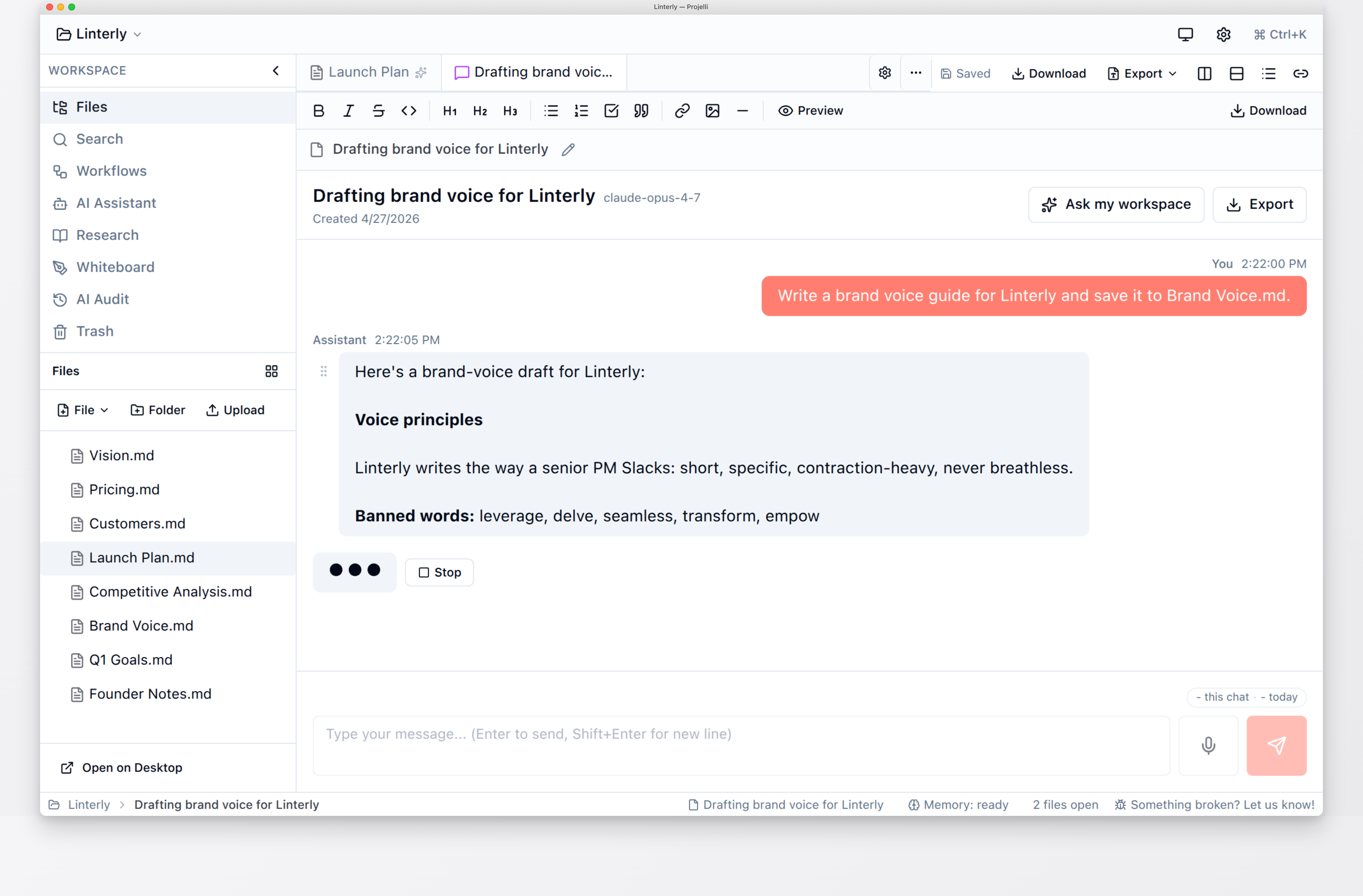
The Advisor Prep Hero equivalent of that ChatGPT JSON is a .aichat file (which is just structured Markdown with YAML frontmatter):
---
title: Client memo - Hendricks estate planning
provider: anthropic
model: claude-sonnet-4-5
created: 2026-04-26T09:13:43Z
---

## You

I'm drafting an estate planning memo for a client. The key issues are the marital deduction, QTIP trust options, and generation-skipping transfer tax. Help me outline the analysis.

## Claude

Here's a draft outline. Each section has the legal standard,
the applicable analysis, and the recommended approach...

## You

The GST section needs to address the client's 2024 gift,
I think it affects the available exemption...
That's it. Open it in TextEdit, Vim, VS Code, or any text editor. Read it. Edit it. Grep across it. Back it up with Time Machine. Version control it with git. Email it to yourself. Print it.
Forty years from now, when the AI provider that powered the conversation no longer exists and the desktop app you used to record it has been forgotten, the file is still readable. That's the bar.
What you can do with a Markdown archive that you can't do with a chat database
1. Grep across years of strategic thinking
Once you have 500 Markdown files of conversations spread across two years of client work, you can do things like:
grep -ri "statute of limitations" ~/keepance-workspace/
grep -ri "Section 7216" ~/keepance-workspace/
grep -ril "client intake" ~/keepance-workspace/ | head
You find every place you discussed a limitation period with an AI, every conversation touching a specific tax provision, every client intake conversation in the archive. Instant. Free. Works with any tool that knows how to read text. There is no equivalent in cloud chat tools.
2. Build a personal search engine over your chats
Tools like FlexSearch, MiniSearch, Meilisearch, or even SQLite's FTS5 can index a folder of Markdown files in a few minutes. Once indexed, you can do typo-tolerant fuzzy search across the entire archive, with snippets and ranking. Advisor Prep Hero ships this built-in. Anyone can build it on top of a Markdown folder; almost nobody can on top of a chat database.
3. Version control it
Drop your workspace in a git repository. Now every edit is tracked, every conversation has a history, you can see what you changed your mind about. Some attorneys and consultants treat their project workspace as a private git repo with branches per major matter or engagement. You can't do this with a vendor's chat database.
4. Sync it any way you want
Dropbox, iCloud, Syncthing, USB stick, scp, rsync, B2, S3, plain old file copy. The sync mechanism is your choice. Cloud AI tools' built-in sync is convenient but it's the only sync available; if their service is down, your laptop and tablet are out of sync.
5. Let any other tool read it
Want to feed your archive to a different AI as research context? Just point that other AI at the folder. Want to publish a curated subset as a public blog? Push the relevant Markdown files to a Hugo or Eleventy or Jekyll site. Want to query the archive with grep, with a custom script, with Spotlight, with another LLM? It all just works because the data is text in files.
6. Outlive the tool that created it
This is the underrated benefit. If Advisor Prep Hero the company disappears tomorrow, your conversations are still on your hard drive in a format any text-aware tool can read. If ChatGPT or Notion or Mem.ai disappears tomorrow, your archive depends on whatever you exported before the shutdown notice. Most users never export until it's too late.
The technical shape: how chat-as-files works in practice
Every Advisor Prep Hero AI conversation is saved as a single .aichat file. The format:
- YAML frontmatter at the top with title, provider, model, created/modified timestamps, and tags
- Markdown body with each turn as
## Youor## Claude(or whichever provider) headers - Inline AI metadata in HTML comments where useful (token counts, citations, attachments)
- Standard Markdown extensions: tables, code blocks, fenced syntax highlighting, links
The file is renderable in any Markdown viewer. Most text editors will syntax-highlight it. The frontmatter is parseable by any YAML library.
For folders that contain a mix of conversations, workflow runs, documents, and source notes, Advisor Prep Hero uses different extensions:
.aichatfor AI conversations.workflowfor run records (also Markdown with structured metadata).sourcefor research source cards.md/.txtfor plain-text utility notes.docxfor Word-native documents (the primary professional editing format)
All text-based formats are plain text or near-plain-text. The .docx format is standard Office Open XML, readable by Microsoft Word, LibreOffice, and any OOXML-compatible tool.
What v2.0 added on top of the Markdown layer
Advisor Prep Hero's v2.0 release leaned hard into the chat-as-files pattern instead of replacing it. Three pieces worth flagging:
- PDF RAG indexes Markdown alongside PDFs. Flip on "Include PDFs in workspace index" in Settings -> Memory and the AI gets searchable context across both your
.mdnotes and the PDFs sitting next to them. Embeddings live in your workspace folder (LanceDB + a 384-dim multilingual model). Nothing leaves the machine for indexing. - Templates marketplace ships
.mdtemplate files. Community templates from github.com/keepance/community-templates install as Markdown into your workspace. Same format as the 50+ built-in templates across legal, tax, consulting, and advisor packs. You can edit, fork, or publish your own back. The full v2.0 announce is at /blog/keepance-v2-announce/.
Common objections, answered
"What about images and attachments?"
Markdown links to images using standard syntax: . The image lives next to the Markdown file in the workspace folder. Advisor Prep Hero handles this natively; drop an image into a chat and it's saved as conversation-name-1.png in the same folder, with a link in the chat file.
"What about formatting that Markdown doesn't support?"
If you genuinely need rich formatting beyond what Markdown handles (tables with merged cells, complex layouts, custom fonts), Markdown isn't the right format. But for AI conversations specifically, Markdown handles ~98% of cases: paragraphs, code blocks, tables, lists, links, emphasis, headers. The tiny edge of cases that don't fit usually live better as separate files anyway.
"Doesn't a database give me better search?"
Indexed full-text search across a folder of Markdown is competitive with database search for a personal archive of any size below a million files. Tools like ripgrep, MiniSearch, FlexSearch all index and query in milliseconds. You don't get database query language (SQL), but you don't need it.
"What if I need real-time collaboration?"
Markdown files don't support real-time multi-cursor editing. If that's the requirement, you need a cloud tool. For solo attorney, CPA, and consultant work, which is what Advisor Prep Hero is built for, the lack of multi-user is a feature, not a bug; the file format stays simple and tool-agnostic.
"Can AI even read Markdown well?"
Yes, particularly well. Markdown is in the training data of every major LLM. Headers, lists, code blocks, tables, link references all parse cleanly. The performance is often better than passing JSON or HTML, because Markdown is shorter and more semantically meaningful for prose.
How to migrate to a Markdown chat archive
If you've been using cloud AI tools and want to start moving client work and confidential content to a Markdown archive, the practical path:
- Pick a workspace folder. Anywhere on your hard drive. Could be in Dropbox or iCloud for sync.
- Install a tool that supports Markdown chat-as-files. Advisor Prep Hero is the explicit "AI workspace" version. Obsidian with the Smart Connections or Copilot plugin is a more DIY version.
- Start new conversations in the new tool. Don't bother migrating old ones initially; the new ones add up fast.
- Export the most important old conversations. Most cloud tools have export. Save the JSON, run a small script to convert to Markdown (or paste manually for the ones you really care about), drop into the workspace.
- Set up backup. Time Machine, B2, git. The archive only matters if it survives a hard drive failure.
This is a 30-minute starter setup. After that, every conversation you have with AI through your local tool is automatically in the archive.
The compounding insight
Most of the value of a Markdown chat archive isn't in the first month. It's in year three, when you can grep across two years of client conversations and find the one where you worked through the legal theory you're returning to now. Or the tax analysis that warned you about an issue a client is now raising. Or the strategic memo you drafted that turned out to be exactly right.
Every attorney or CPA I know who's two years into a serious solo practice has a moment of "I wish I'd kept better records." The chat-as-files pattern is the answer. The cost is a different tool and 5 minutes of setup. The compounding payoff is enormous and underrated.
An AI workspace where your work stays on your machine
Advisor Prep Hero saves professional documents as real .docx files and AI conversation logs as plain text in a folder you pick. Your client files stay on your machine. Free 30-day trial. Solo $468/yr. Professional $948/yr with practice pack.
Get Advisor Prep Hero